A supplier discovering punchout usually thinks of a connection to plug in between its website and its customer’s procurement tool. It soon finds that plugging in means speaking a language, and that there are two of them: cXML and OCI. Each one sets what the site must answer, in which order, with which fields. And the choice almost never belongs to the supplier.
We have already explained how punchout works and what it means for suppliers and answered the question What is punchout. This article focuses on one precise point: what each protocol actually exchanges, what it requires from the supplier’s site, and how to decide which one to implement first. It is written for e-commerce teams, technical managers and commercial directors at B2B suppliers.
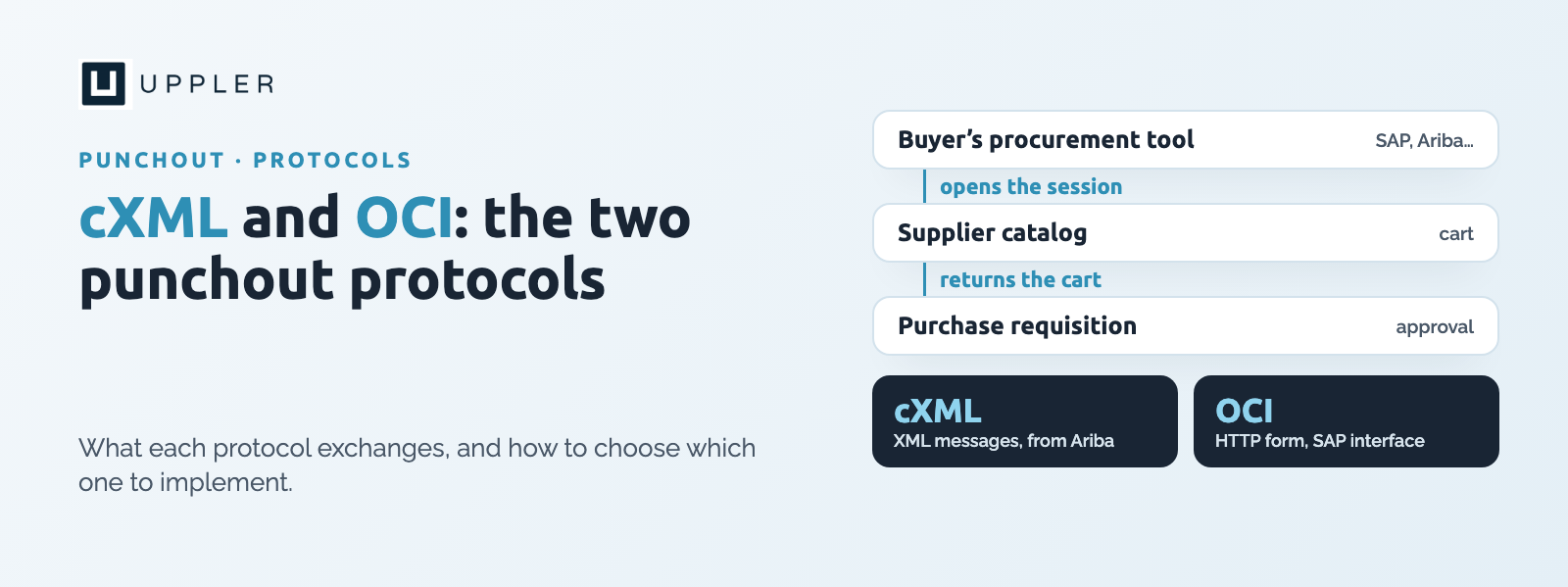
The principle of punchout is the same in both cases. The buyer starts from their procurement tool, lands on the supplier’s catalog, fills a cart, then sends it back to the tool without going through payment. The cart becomes a purchase requisition, which goes through the customer company’s approvals before turning into an order.
What sets cXML and OCI apart is how this round trip is carried out. The first exchanges structured XML messages. The second passes HTTP form fields. The difference looks technical. It has very concrete consequences for security, for user identification and for what the protocol can do after the cart. It follows the logic of indirect purchasing: the order must stay inside the buyer’s process.
cXML, for commerce eXtensible Markup Language, is the standard popularized by Ariba in the late 1990s. Its specification is published on cxml.org, and the cXML User’s Guide describes every element. A punchout session relies on three messages.
According to Unimarket documentation, the opening request contains a header with the sender, the recipient and an authentication identity with a shared secret. It also carries a BuyerCookie, which identifies the buyer’s session, the address where the cart must be returned (BrowserFormPost) and sometimes additional elements called Extrinsic, such as the user’s name or e-mail. The supplier authenticates the request, creates its session and returns the address of the start page. The buyer’s browsing session is only created when they first visit that address.
When the buyer has finished, the supplier builds a PunchOutOrderMessage. It reuses the original BuyerCookie, swaps the From and To fields, states the total with its currency, then describes each line: quantity, line number, supplier part ID, unit price, description, unit of measure and classification code. The message is submitted from the buyer’s browser, to the return address received at the start, with the cxml-urlencoded parameter. It leaves from the browser, not from the server, to keep the session cookies.
Four elements of the opening request must be stored with the session: the BuyerCookie, the return address, and the From and To fields. Without them, the cart cannot be rebuilt. A mistake here explains a large share of failed tests.
cXML does not stop at the catalog. According to Optimizely, the protocol also provides the purchase order, which sends the supplier the formalized order after approval. Not every integration uses the three interfaces, and the order can go through electronic data interchange (EDI) instead. This continuity up to the order, sometimes up to the invoice, is what makes cXML more complete than OCI.
OCI, for Open Catalog Interface, is SAP’s catalog interface, used mainly with SAP SRM. According to Tradecentric, the supplier’s catalog is displayed inside the buyer’s tool, often in an embedded frame, and the cart comes back automatically.
The buyer triggers the session from their browser. According to PunchOut Commerce, the login request is most often an HTTP POST. It must contain a return address, called HOOK_URL, and generally a username and password, whose parameter names are configured buyer by buyer. An optional parameter, ~TARGET, gives the form target when the procurement tool displays the catalog in a frame. The supplier must store HOOK_URL and ~TARGET with the session.
The cart returns in an HTML form whose action points to HOOK_URL. Each field follows the pattern NEW_ITEM-NAME[line number], for example NEW_ITEM-DESCRIPTION[3]. The main fields are the following:
These lengths are the ones published by PunchOut Commerce. Other sources give different limits for the description depending on the OCI version, so each limit should be confirmed with the SAP documentation or with the customer’s team. As an indication, OCI provides up to forty fields per line, but most integrations use seven to fifteen.
OCI covers the catalog and the cart, not what follows. The order, the confirmation, the shipping notice and the invoice are not part of the specification. Another limit noted by Tradecentric: the default login mode uses a username shared by all buyers of the same organization, which can cause cart conflicts when several people connect at the same time. OCI 5.0 adds support for the JSON format.
As we wrote in the article on punchout, the supplier rarely chooses between the two protocols. The choice follows from the procurement tool of its customers. A customer on SAP SRM will ask for OCI. A customer equipped with a more widespread procurement platform will most often ask for cXML: according to Tradecentric, cXML is the most widespread protocol among e-procurement platforms, while OCI remains centered on SAP. To understand what the buyer’s tool looks like, see our guide to the e-procurement platform.
The consequence is simple. A supplier that sells to several large accounts almost always ends up supporting both. It is better to know this before sizing the project. The case of Proachat and Best Western, where an e-procurement catalog is built for a hotel network, shows what this approach gives on a real project.
Most test failures come from details, not from the overall design. The most frequent ones:
Several of these pitfalls come back to the same subject: catalog quality. Our article on catalog integration shows why clean data decides success even before the protocol.
List, for your first ten to twenty customers, the procurement tool in use and the protocol expected. The result decides the scope: cXML only, OCI only, or both.
Implement first the one that covers the largest share of your customers. For the second, a gateway that converts OCI to cXML can avoid building two separate chains. PunchOut Commerce recommends this approach for a site that is already cXML-compatible.
For each item, set the supplier part number, the description, the recognized unit of measure, the price and the expected classification code. This correspondence table is the real working document of the project.
Have the three steps validated with one customer: opening the session, filling the cart in the catalog, returning to the procurement tool. A successful test on a simple case proves nothing until units, currencies and discounts have been checked.
Punchout runs on two protocols, and the buyer decides which one you must speak.
Preparing a connection to your customers’ procurement tools? Talk to our team to scope the protocol, the catalog and the timeline. For an overview, see also our article on marketplace and e-procurement.
cXML, for commerce eXtensible Markup Language, is an XML exchange standard between a procurement tool and a supplier. It covers the catalog in punchout, and also provides the purchase order.
OCI, for Open Catalog Interface, is SAP’s catalog interface. It lets an SAP procurement tool open a supplier’s catalog and retrieve its cart through an HTTP form.
cXML exchanges XML messages and provides what follows the order. OCI sends form fields and stops at the catalog and the cart. cXML identifies users better, while OCI often uses a shared username.
The choice depends on your customers’ procurement tools. A supplier that sells to several large accounts often has to support both.
In cXML, a PunchOutOrderMessage is submitted from the buyer’s browser to the return address. In OCI, an HTML form posts the lines to the HOOK_URL.
Generally the description, quantity, unit, price, currency and supplier part number. Required fields vary by buyer, so the mapping must be validated with each customer.
Punchout handles the catalog and the cart. The purchase order is provided by cXML. The invoice depends on the integration and on the exchange channel chosen by the buyer.
It depends on the catalog, the protocol and the customer. The longest phase is often the data mapping and the tests with the first buyer.
1-month launch with our all-in-one solution
Specialized in B2B e-commerce
Integration team to make your project easier

Morgan Clark
Platform manager at Label Corner
"Customer service is highly responsive and the plateform is easy to use.
The solution has a great adaptability, great value for money and enables a fast implementation"